
You finally check your email after weeks of waiting for your child’s OCI card and see the update: application rejected. The reasons? Usually just a vague line like “documents not clear” or “signature mismatch.” It’s frustrating, confusing, and leaves you wondering what actually went wrong.
Many parents face this exact situation. The official explanations often lack detail, and without clear guidance, fixing the issue can feel like starting the entire process from scratch wasting both time and money.
Based on real cases and repeated patterns, most OCI minor application rejections come down to a few specific, avoidable mistakes. In this guide, we’ll break down the actual OCI Minor Application Rejection Reasons , explain what those vague messages really mean, and show you how to fix them correctly, so you can reapply with confidence and avoid another rejection.
Read Also:- How to Fill OCI Parental Authorization Form for Minors (Step-by-Step)
Why OCI Minor Applications Get Rejected?
An OCI application for a minor is fundamentally different from an adult’s. The consulate isn’t just verifying the child; they are verifying the parents and the legal relationship between them. Every document is scrutinized to establish a clear, unbroken chain of identity and guardianship.
The entire process is a strict procedural check. There’s no room for interpretation. An officer spends just a few minutes on each application, looking for reasons to reject it, not approve it. If a document is blurry, a signature doesn’t match, or a name is misspelled by a single letter, it’s an instant rejection. They won’t call you to clarify. They just send it back. The burden of perfection is entirely on you.

Most Common OCI Minor Application Rejection Reasons
From our day-to-day work, we see the same patterns repeat. These aren’t complex legal issues. They are simple, frustrating errors in documentation and data entry. Getting these details right is the whole game.
Document-Related Rejection Cases
This is the number one cause of OCI minor application rejection reasons. The system is unforgiving.
- Birth Certificate Issues:- We constantly see people uploading a standard copy of the birth certificate. For children born outside India, you often need an apostilled or attested copy, depending on the country. For children born in India, a simple copy might work, but it must be perfectly legible. A rejection for “Proof of relationship not clear” often points directly to a problem with the birth certificate. It must clearly list both parents’ full names as they appear on their passports.
- Parental Documents:- You need clear copies of the passports for both parents. We saw a case rejected because the father’s passport copy was slightly cut off at the bottom, obscuring the signature. Another common OCI minor application error is submitting an expired passport copy for one parent. Even if one parent isn’t traveling, their documents must be current and valid. The marriage certificate is also mandatory to link the two parents together. Forgetting it is an automatic rejection.
- Proof of Address:- The address proof (like a utility bill or driver’s license) must exactly match the address you entered in the application form. It must be recent, typically within the last 90 days. We had a client get rejected because their application said “Apt 101” but the utility bill said “101.” That tiny difference was enough.
Signature & Parental Consent Issues
For minors, signatures and consents are a minefield. The rules are rigid.
- Thumb Impression vs. Signature:- For children under 5 years old, a thumb impression is required in the signature box. It’s not a suggestion. We’ve seen rejections because a parent signed the child’s name instead. The impression must be clear and not smudged. Use a good quality ink pad. The convention is the left thumb for boys and the right thumb for girls. For children over 5 who can sign, their signature must be consistent and stay within the box.
- Parental Consent Form:- This is non-negotiable. Both parents must sign this form. The signatures MUST match the signatures on their respective passports. If they don’t, it’s an immediate red flag and a likely rejection. If one parent has sole custody, you need to provide the court order. If a parent is unavailable for other reasons, a notarized affidavit explaining the situation is required. Don’t leave this to chance.
Photo & Upload Errors
The digital part of the application is where many people stumble.
- Incorrect Photo Specifications:- The photo must be 2×2 inches (or the digital equivalent, often 51×51 mm) with a plain white or light-colored background. No shadows. The child’s face must be centered, with a neutral expression (no smiling). We saw an application rejected because the baby had a pacifier in its mouth. Another was rejected because the background had a faint pattern.
- Poor Scan Quality:- This is a classic OCI application rejected for child reasons. The rejection will say “Documents Illegible.” This means your scans are blurry, too dark, or have shadows. Use a flatbed scanner, not your phone. Every letter and number on the passports, birth certificates, and other documents must be crystal clear. The file size limits are also strict, so you need to scan at a resolution that is clear but doesn’t create a massive file.
Mismatch in Details
Consistency is everything. The information you type into the online form must be a 100% match with the supporting documents.
- Name Discrepancies:- If the child’s passport says “Rohan Kumar Sharma” but you enter “Rohan K. Sharma” on the form, that’s a mismatch. If the mother’s name on the birth certificate is “Priya Patel” but on her passport it’s “Priya Mehta” (due to marriage), you need to provide the marriage certificate to bridge that gap. Any unexplained difference in names across documents is a major red flag.
- DOB and Passport Number Errors:- A simple typo here is a guaranteed rejection. Double-check, then triple-check the date of birth, passport number, and issue/expiry dates against the actual passport before you hit submit.
Real Case Examples of OCI Rejection
Let’s look at some real-world screw-ups we’ve helped fix.
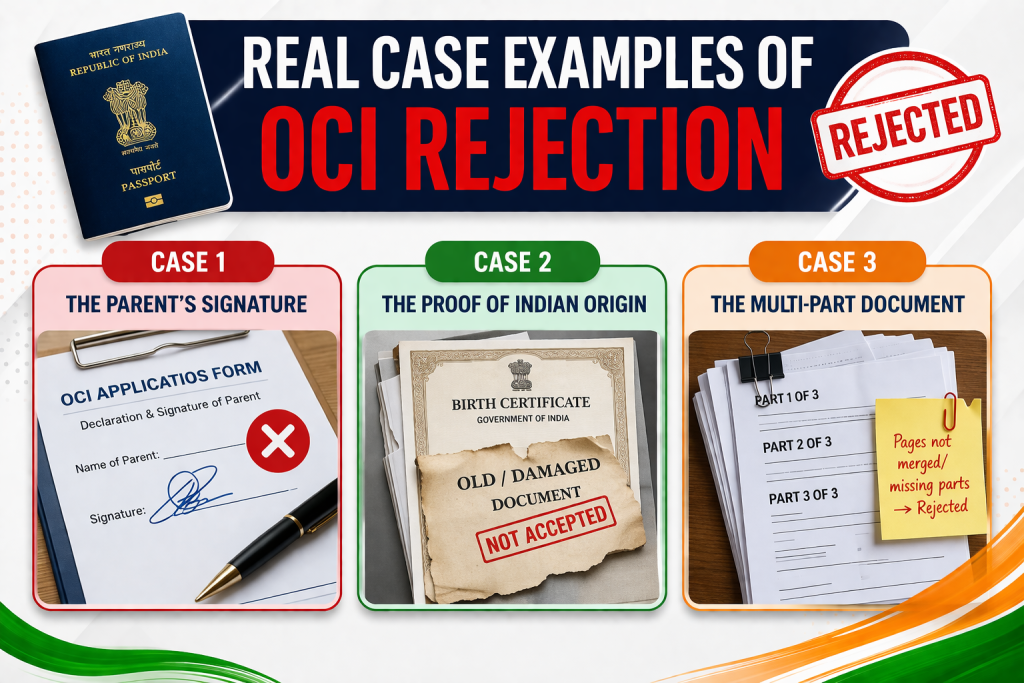
- Case 1: The Parent’s Signature:- An application was rejected for “Signature Mismatch.” After reviewing, we found the father’s signature on the parental consent form was a quick, sloppy version of his name. His passport signature was much more formal and complete. The officer couldn’t verify they were the same person. The fix was simple: re-sign the form exactly as it appears on the passport and re-upload.
- Case 2:- The Proof of Indian Origin:- An application was rejected because the “Proof of Indian Origin” was deemed insufficient. The parents were naturalized US citizens and provided their own OCI cards. This is not enough. The consulate needed a copy of their surrendered Indian passports or other documents proving their former Indian citizenship. They had to dig up their old passport copies to get the application approved.
- Case 3:- The Multi-Part Document:- A family’s application was rejected for “Incomplete Document.” They uploaded the first page of their child’s birth certificate, but it was a two-page document. The consulate requires all pages of any document to be scanned and uploaded as a single PDF file.
What to Do After OCI Application Rejection?
First, don’t panic. You usually don’t have to pay the fee again.
- Read the Email Carefully:- The rejection email will have a reason. It might be vague, but it’s your starting point. “Upload Passport Copy” means there’s an issue with the one you sent.
- Log into the OCI Portal:- Use your application reference number to access your file. The system will typically show you which specific document category needs attention.
- Prepare the Correct Document:- Based on the rejection reason, prepare the correct document. Get a better scan, get the right signature, or find the missing paper.
- Re-upload and Submit:- Upload the corrected document into the designated slot. You are not starting a new application; you are just fixing the existing one. Once uploaded, the application goes back into the queue.
How to Avoid OCI Rejection (Expert Tips)
From working closely with this process, we’ve learned a few things that aren’t in any official guide.
- Create a Digital Dossier First:- Before you even start filling out the online form, create a folder on your computer. Scan every single required document perfectly. Name each file clearly (e.g., “Child_Passport.pdf,” “Father_Passport.pdf,” “Marriage_Certificate.pdf”). Resize the photo and signature files to the exact specifications. This preparation prevents panicked, last-minute mistakes.
- The “One PDF” Rule:- If a document has multiple pages (like an old passport or a birth certificate with a back page), scan all pages and combine them into a single PDF file. Uploading just the first page is a common error.
- Anticipate the Questions:- If your situation is anything but straightforward (divorce, name change, one parent not a citizen), gather the supporting evidence beforehand. Have the court orders, name change affidavits, or naturalization certificates ready and notarized. Don’t wait for them to ask for it.
Conclusion
Most OCI Minor Application Rejection Reasons come down to small, avoidable mistakes like unclear documents, signature issues, or incorrect details. By carefully reviewing errors and fixing them properly before reapplying, you can avoid delays and get your child’s OCI application approved smoothly.
FAQ (OCI Minor Application Rejection Reasons)
Do I need to send physical copies again after an online rejection?
No. If your application was rejected at the initial online review stage, you typically only need to correct the digital files by re-uploading them through the OCI portal. You only send physical documents after the application has been “Acknowledged” online.
What if one parent is not available to sign the consent form?
You need to provide a legal document explaining why. This could be a sole custody court order, a death certificate, or a notarized affidavit explaining the parent’s absence and granting permission for the OCI application. Simply leaving one signature blank is not an option.
The rejection reason is just “Other.” What does that mean?
This is the most frustrating one. “Other” is a catch-all for anything that doesn’t fit the standard categories. It often means there’s a complex issue, like a discrepancy in the parents’ proof of former Indian origin, or a name mismatch that spans multiple documents. In this case, you may need to carefully re-examine every single piece of information you submitted to find the inconsistency. It might require a call or email to the consulate for clarification, though responses can be slow.