
Getting your OCI card should be a smooth process—but for many applicants, it turns into a frustrating experience due to small mistakes in the application form. A single incorrect detail or missing information can lead to delays, rejections, or repeated document requests.
That’s why so many people search for an OCI registration sample form 2026 to understand exactly how the form should be filled and avoid costly errors. Having a proper example in front of you makes the entire process easier, faster, and more accurate.
In this guide, you’ll get access to the latest OCI registration sample form, along with clear, step-by-step instructions to fill it correctly. We’ll also highlight common mistakes, important tips, and practical insights to help you complete your application without stress.
Read Also:- How to Apply for OCI Card in USA: Complete Process (2026)
What is an OCI Registration Form?
The OCI (Overseas Citizen of India) registration form is your official application to the Government of India for a lifelong visa and other benefits granted to people of Indian origin. It’s not a simple contact form, it’s a detailed document that collects your personal, passport, family, and address information to verify your eligibility. The entire process starts with this form. Get it wrong, and your application stalls before it even begins.
The application is filled out online through the official OCI Services website. There is no physical paper form to start with anymore. You fill everything online, upload your documents, and then print the completed application for your in-person appointment.
Why Do You Need a Sample Form Before Applying?
Looking at a sample form before you start the real thing is just a smart move. It helps you gather all the necessary information and documents beforehand. You can see exactly what details you’ll need about your parents or grandparents, what passport numbers are required, and how addresses need to be formatted.
From our day-to-day work, we know that the biggest cause of delays is incomplete information. Having a sample lets you do a dry run. You can practice filling it out, identify any questions you have, and make sure every piece of required documentation is sitting on your desk, ready to be scanned and uploaded. It simplifies the process and turns a confusing task into a simple checklist.
Download OCI Registration Sample Form 2026
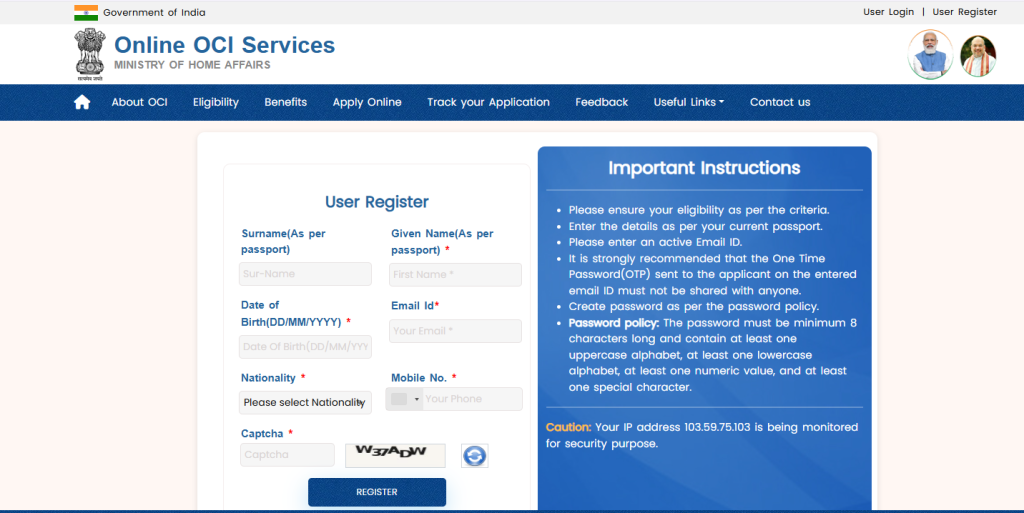
Let’s be direct: there is no official “2026” form released years in advance. The Government of India updates the form as needed, but the core structure rarely undergoes massive changes. The current form is the best and most accurate sample you can use to prepare for 2026.
You can view and work with the current OCI application form sample directly on the official Government of India OCI Services website. Go to the “New OCI Registration” section to see the fields you’ll need to fill. This is the live source, and it’s the only one you should trust.
- Go to the official portal `ociservices.gov.in`
- Click on “New OCI Registration”
- Review the fields, Before entering any data, just look through all the sections. This is your sample.
This is the most reliable way to prepare for the `OCI registration process 2026`.
Overview of OCI Application Sections
The online application is broken down into a few key parts. Here’s what you need to have ready for each.
Personal Details
This is the easy part, but precision is key. Your name must match your current, non-Indian passport exactly. Don’t use nicknames. If your name has changed, you will need to provide legal proof, like a marriage certificate or a court order. You’ll also provide your date of birth, country of birth, and gender.
Passport Information
You will need your current passport details (number, issue date, expiry date) and, critically, details of any previous Indian passport you held. If you are applying on the basis of your parents’ or grandparents’ Indian origin, you won’t have this, but if you were once an Indian citizen, you must provide details of your surrendered passport.
Family Details
This is where many people get stuck. You need your parents’ full names, dates of birth, places of birth, and nationality. If they were ever Indian citizens, you’ll need to state that. If you are applying through a spouse, you’ll need all their details as well, including their Indian origin proof. Gather this information before you sit down to apply.
Address Information
You need to provide your current residential address. This address must match the proof of address document you submit, like a utility bill or driver’s license. You will also be asked for an address in India, which can be a relative’s address.

How to fill the OCI Registration Form?(Step-by-step process)
This is the core of the `OCI form filling guide 2026`. Follow these steps methodically.
Step 1: Start the Application and Get Your Temporary ID
Go to the official OCI website and click “New OCI Registration.” Fill out the initial security questions and basic details. The system will generate a Temporary Application ID. Write this down immediately. If your browser crashes or you need to pause, you can use this ID to resume your application later.
Step 2: Fill in Applicant’s Particulars
This is where you enter all the personal and passport information we discussed earlier. Double-check every single entry. A typo in your name or passport number will get your application sent back. Be methodical. Go slow.
Step 3: Enter Family Details
Carefully enter the details for your parents and spouse (if applicable). This section is used to establish your “Indian origin” link. If you are applying based on your parents’ Indian citizenship, make sure their names here match their Indian passports or other proof documents exactly.
Step 4: Upload Your Photo and Signature
This is a major failure point. The system is very strict about the digital photo and signature specifications.
- Photo:- Must be a 2×2 inch size, JPEG format, with a plain light-colored background. Your face should be centered and clearly visible. No shadows.
- Signature:- Sign on a plain white piece of paper with a black pen, scan it, and crop it to the required aspect ratio and the signature should not be cut off.
Upload these files. If the system rejects them, fix the size or format and try again until it accepts them.
Step 5: Upload Supporting Documents
After completing the form, you will be prompted to upload the `documents required for OCI application`. Scan each document clearly in PDF format. This includes:
- Your current passport.
- Proof of your Indian origin (e.g., your old Indian passport, parents’ Indian passports, birth certificate).
- Proof of address.
- Marriage certificate (if applying through a spouse).
Once all documents are uploaded, you can submit the form. You will then get a final Application Reference Number (ARN).
Important Instructions While Filling the Form
- Use Capital Letters:- Fill out the entire form in capital letters, unless specified otherwise.
- Not Applicable:- If a field does not apply to you, write “N/A” or “NOT APPLICABLE.” Do not leave it blank.
- Save Your Progress:- The online portal can be glitchy. Save your progress often using the Temporary Application ID.
- Thumb Impression for Minors:- For minors who cannot sign, a left-thumb impression is required.
Common Mistakes to Avoid
From what we’ve seen over the years, these are the errors that trip up 90% of applicants:
- Name Mismatch:- Your name on the form, your current passport, and your proof of origin documents must all match. If they don’t, you need legal documentation (like a name change deed) to explain why.
- Incorrect Photo/Signature Specs:- Failing to meet the exact size, background color, and format requirements for the photo and signature is the 1 reason for immediate rejection. Use an online photo resizing tool if you need to.
- Incomplete Family Information:- Forgetting to enter your parents’ full details or providing partial information will stop your application cold. The entire eligibility check rests on this link.
- Uploading Blurry Documents:- Your scanned PDFs must be perfectly legible. If the official can’t read your birth certificate or passport copy, they will send the application back.
How to Submit the OCI Application Form?
Submitting the form is a two-part process.
First, you complete the online submission. This is when you finalize the form, upload all documents, and receive your final ARN.
Second, you take a printout of the completed application form. You will also need to gather the original copies of all the documents you uploaded, plus one set of photocopies. You will then book an appointment at the designated application center (like VFS Global in many countries) to submit the physical application and original documents for verification.
FAQs on OCI Registration Sample Form
1. Can I use a sample form from a third-party website?
We strongly advise against it. Forms can become outdated, and unofficial sites might have incorrect versions. The only trustworthy source is the official Government of India OCI Services portal. Use it to see the live, current fields.
2. What if my parents are deceased and I don’t have their passports?
This is a common situation, you will need to provide their death certificates. To prove their Indian origin, you can use other documents like their birth certificates issued in India, domicile certificates, or school leaving certificates that state their nationality as Indian.
Conclusion- OCI Registration Sample Form 2026
Getting an OCI card is a straightforward process, but it demands attention to detail. The online form is the gateway, and any error there creates a ripple effect of delays. Don’t rush it. Use the official government portal as your `OCI application form sample`, gather every single document before you start, and double-check every field before you hit submit.
Looking toward 2026, we expect the process to remain largely digital. The government may introduce more streamlined verification, but the core requirement—proving your identity and Indian origin with precise documentation—will not change. Prepare properly, and you’ll get it done right the first time.