
OCI Application Status:-The Indian government processes over 300,000 OCI applications annually, and every single one goes through the same, user don’t know the e status means it is process is hidden or uncleared. The biggest challenge we see is the anxiety caused by a lack of clarity; people just want to know where their application is in the long, winding process. So we’re going to give you the direct, step-by-step playbook for How to Check OCI Application Status Online? A Step-By-Step + Real-Time Tracking, decoding the cryptic messages so you know exactly what’s happening.
4 Steps to check to Check OCI Application Status Online
Step 1: Access the Official Portal
The only place that matters for the main part of the process is the official Government of India OCI Services website. Don’t bother with third-party sites; they are just guessing.
Go directly to the “OCI-Enquiry” page.
You will see a simple form.
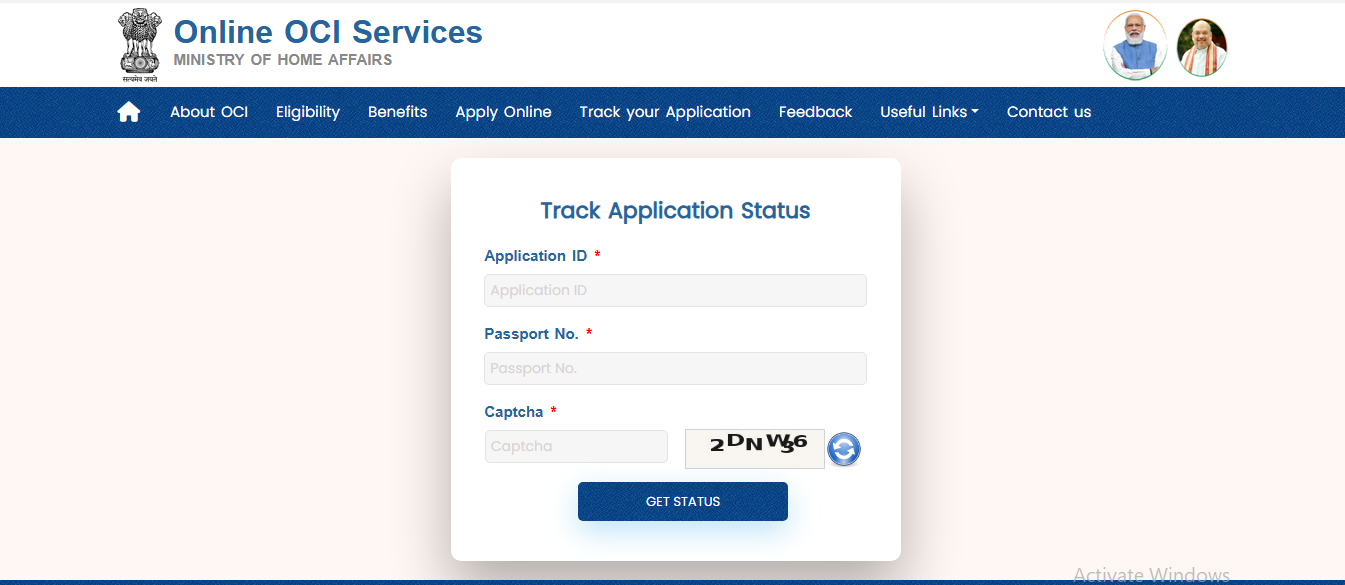
Step 2:- Get Your Credentials Ready (Application ID and Passport Number)
It includes two key pieces of information. Forget everything else. These are given below-
Application ID: This is NOT your Application Reference Number. The number you need is the one you got from VFS Global after they accepted your physical application. It typically starts with the country code, like “USA…” or “CAN…”. It’s on the receipt VFS gave you. Find that piece of paper.
Passport Number: Your current, valid passport number. The one you used for the application. Have these two things handy. Without them, you’re going nowhere.
Now In that form the captcha text shown on the screen. Double-check the details. A single typo will give you an error. Hit “Submit”.
Step 3: Decode the Status Messages
This is where everyone gets confused. The status messages are not clear and create confusion. After years of working with this system, here’s what they actually mean.
- OCI Application Status shows UNDER-PROCESS: This is the starting point and often the longest phase. It means your application has been received and is undergoing initial verification and background checks. It can stay in this status for weeks, even months. This is normal. Do not panic.
- OCI Application Status shows PROCESSED: A good sign. Your application has cleared the initial step at the consulate or embassy and has been forwarded to the Ministry of External Affairs MEA in Delhi for final approval and printing.
- OCI Application Status shows Dispatched From Mea :Your OCI card has been printed in Delhi and is now in transit to the Indian Mission
- OCI Application Status shows Document Received At Your Consulate: This is the key update you’re waiting for. It means your physical OCI card has arrived at the local consulate.
From this point on, the Government of India portal is less important.
Step 4: Switch To VFS Global Tracking
Once the status shows “DOCUMENT RECEIVED AT YOUR CONSULATE”, the ball is in VFS Global’s court. They are responsible for the final handover. Now, you need to go to the VFS Global website for your country. Use their tracking tool.
Here, you’ll typically use your VFS Reference Number
The same File Reference Number and your date of birth to see the final status whether it’s ready for pickup or has been dispatched by courier. This is the “last mile” of the tracking process.
Insider Tracking Suggestion from helpoci
The online system is complex sometimes, and there are patterns. Don’t check the status every day. It’s a waste of energy and will just drive you crazy.
Set a reminder to check once a week, maybe on a Friday. The status rarely updates more frequently than that. There’s a notorious “black hole” period during the “UNDER-PROCESS” stage.
It feels like nothing is happening for 4-6 weeks. This is standard procedure. The system is working, even if it’s not showing you progress. And please, do not call or email the consulate asking for a status update.
They are looking at the exact same screen you are. They have no secret information. All you will do is clog up their phone lines.
Trust the online process; it is slow, but it is accurate.
At The END
The OCI Application Status is a two-part game: first the Government of India portal for the main processing of ci card, then the VFS portal for the final delivery.
Understand the language of the status updates, know when to switch between trackers, and have some patience. The system works, but it operates on its own timeline, not yours.
People also search about OCI Application Status
Q1: My status has been stuck on ‘PROCESSED’ for three weeks. Is there a problem?
No, this is common. After your application is “PROCESSED” by the local mission, it enters the queue in Delhi. There can be a backlog there for printing and dispatch. Three weeks is not unusual at all. We’ve seen it take longer. It’s just a waiting game at this point.
Q2: The OCI portal says my card was dispatched a week ago, but VFS tracking says they haven’t received it. Who is right?
Both are. The “DISPATCHED FROM MEA” status is triggered the moment the card leaves Delhi. It then has to go through international shipping, clear customs, arrive at the consulate, and then be handed over to VFS for sorting. This entire logistical chain can easily take 7-10 business days. The lag is normal.
Q3: I lost my VFS receipt with the File Reference Number. What can I do?
This is tough, but not impossible. Your first step should be to check your email for any communication from VFS when you submitted your application; the number is often included. If not, you will have to contact VFS Global’s support directly. Be prepared to provide your full name, passport number, and date of birth to verify your identity before they can assist.